
A new enquiry arrives on WhatsApp.
Another comes through the website.
Someone comments on Instagram and asks for a price.
A salesperson writes one name in a notebook, forwards another message to a colleague and promises to call the third prospect tomorrow.
Nothing appears obviously broken.
The team is busy.
Messages are being answered.
Calls are being made.
But management still cannot answer three basic questions:
Which enquiries are waiting?
Who owns the next step?
What should happen next?
That is not necessarily a demand problem.
It is often a customer-journey problem.
The opportunity is not simply to automate more tasks.
It is to make the journey from enquiry to follow-up visible, owned and easier to manage.
Start With the Journey, Not the Tool
Consider this illustrative scenario, not a reported client result.
A Nigerian service business receives enquiries through:
- Website forms
- Social media
- Campaigns
- Referrals
Before redesign, those conversations sit in separate places.
Follow-up depends on memory.
Salespeople keep personal notes.
Management can see activity, but not progression.
After redesign, every opted-in enquiry enters a defined workflow.
The system records:
- Where the enquiry came from
- What the customer asked for
- Who owns the next step
- What action is due
- Whether the customer replied
- Whether the enquiry progressed or stalled
People still sell.
People still qualify.
People still negotiate.
The system makes sure the work does not disappear.
Here are five parts of that journey worth examining.
1. Capture Every Consented Enquiry in One Working Record
The first improvement is not an AI chatbot.
It is a dependable record.
A website form, approved WhatsApp workflow or campaign response should create or update one working contact record.
That record may include:
- Name
- Business or organisation
- Preferred contact channel
- Expressed need
- Source
- Time received
- Consent status where relevant
- Owner
- Next action
The purpose is simple:
The team should not need to reconstruct the enquiry from several inboxes later.
Keep the Record Small and Useful
Do not collect information merely because a form can ask for it.
Start with what the team genuinely needs to handle the enquiry.
For example:
Name
Who is making the request?
Business
Which organisation is involved?
Need
What are they asking about?
Source
Where did the enquiry come from?
Preferred contact route
How should the conversation continue?
Owner
Who is responsible?
Next action
What happens next?
That is often enough to begin.
Avoid Duplicate Records
The same person may:
- Submit a website form
- Message on WhatsApp
- Reply to an email
- Book through a campaign
The workflow should check whether an existing contact or account may already match.
Do not create a new record automatically every time a message appears.
Duplicate records split customer history and create conflicting ownership.
Where the match is uncertain, flag it for review rather than silently merging or duplicating.
Define the Source Before Automating It
Automation should work only with approved data sources.
Do not scrape private conversations or collect unnecessary personal information.
Before connecting a channel, define:
- What information enters the system
- Why it is needed
- How consent is handled where required
- How duplicates are checked
- Who may access the record
The first automation should create clarity, not a larger data problem.
2. Send an Immediate Acknowledgement, Not a Fake Human Conversation
An automated acknowledgement can be useful.
It can:
- Confirm receipt
- Set expectations
- Explain support hours
- Ask one necessary question
- Offer a legitimate next step
But it should not pretend that a person has already reviewed the request.
For example:
“Thanks for contacting TechBots. We’ve received your message. Please select the area you need help with, and our team will respond during support hours, Monday–Friday, 9:00 a.m.–6:00 p.m. GMT+1.”
That is clear.
It tells the customer:
The message arrived.
The system is automated.
A human response will follow.
Separate Acknowledgement From Useful Response
These are two different events.
Acknowledgement:
The customer knows the request arrived.
Useful response:
The customer receives information that actually moves the enquiry forward.
Do not treat a two-second auto-reply as proof that the business responded effectively.
Track both.
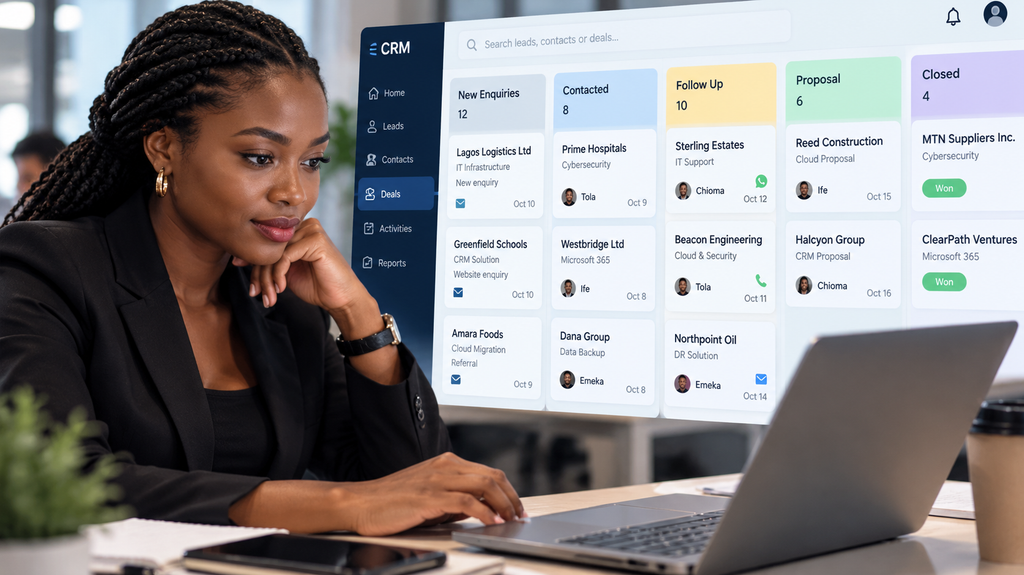
3. Turn Follow-Up Into a Sequence With Ownership
Follow-up should not depend entirely on memory.
A practical workflow may:
- Assign the enquiry to an adviser.
- Create the next-action task.
- Set a due time.
- Remind the adviser before the deadline.
- Escalate if the enquiry remains unowned.
- Pause automated follow-up when the customer responds.
The system supports the sequence.
A person still owns the relationship.
Follow-Up Should Reflect What Actually Happened
A good next action is specific.
For example:
Weak:
Follow up.
Better:
Call Tuesday to confirm whether the prospect wants a technical assessment.
Or:
Better:
Send the requested Microsoft 365 workflow example and review it with the prospect on Thursday.
That creates a more useful record.
Stop Conditions Matter
Automation should know when to stop.
Pause or end the sequence when the prospect:
- Replies
- Books a meeting
- Opts out
- Becomes unsuitable
- Asks not to be contacted
- Moves into another workflow
More messages are not automatically better.
A long automated sequence does not turn weak interest into strong intent.
Relevance and control matter.
4. Let Qualified Prospects Book the Right Conversation
Booking automation is useful when the customer is ready for a conversation.
But the booking step should match the type of enquiry.
For example:
A technical-support enquiry may need a different person from a business-growth enquiry.
A training enquiry may need different preparation from an infrastructure discussion.
Before showing booking availability, collect only enough information to route the request properly.
That may include:
- Area of interest
- Company
- Basic need
- Preferred timing
- Relevant context
Tell the Prospect What the Meeting Is For
A booking page should explain what the conversation will cover.
For example:
“Use this 30-minute consultation to review your current workflow, clarify the business problem and identify the most appropriate next step.”
That is better than a generic:
“Book a meeting.”
For an approved TechBots consultation, use:
Book a 30-minute TechBots consultation
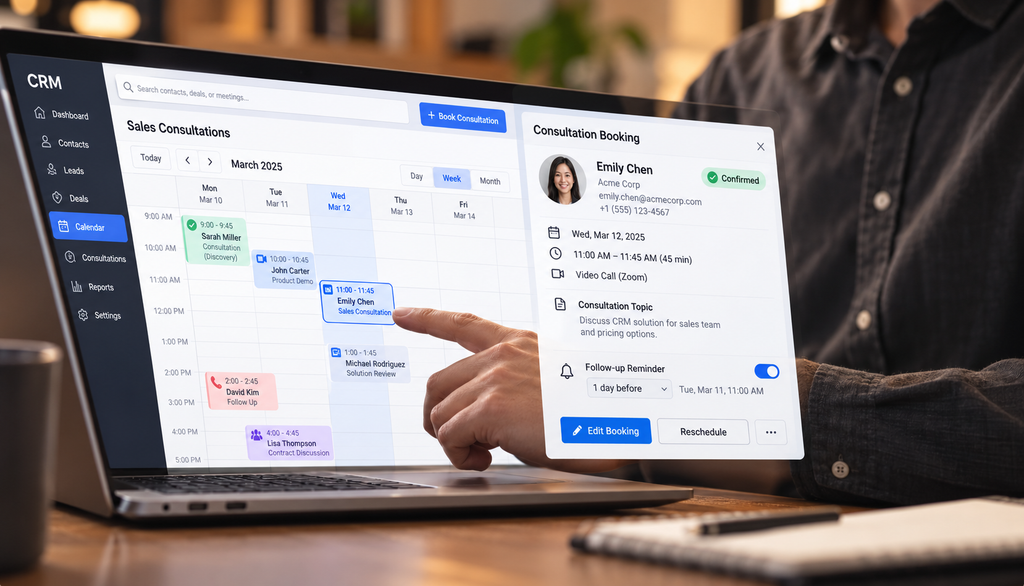
Confirm the Booking Actually Succeeded
Do not assume the meeting exists because the system attempted to create it.
Verify:
- Calendar event created
- Correct time zone
- Participant added
- Confirmation sent
- CRM record updated
If the booking fails, make the failure visible.
Do not tell the prospect:
“Your meeting is confirmed.”
when the calendar update never completed.
5. Request Feedback at a Genuine Completion Point
Feedback automation should begin after something meaningful has happened.
That might be:
- Completed delivery
- Resolved support case
- Finished consultation
- Completed training
- Confirmed project milestone
Do not ask for a public review immediately after someone submits an enquiry.
The customer has not experienced enough value yet.
Keep Feedback Optional
A feedback request should:
- Be voluntary
- Use clear language
- Avoid pressuring the customer
- Avoid writing the customer’s review for them
- Offer a human recovery route when dissatisfaction appears
For example:
“We’d value your feedback on the support you received. If anything remains unresolved, please let us know so the team can review it.”
That supports both reputation and service recovery.
Do Not Suppress Negative Feedback
If a customer reports a problem, route it to a person.
Do not automatically hide the issue or redirect only happy customers toward public review channels.
The goal should be better service, not artificially perfect ratings.
What the Connected Journey Changes
The benefit of this workflow is not that software “closes deals by itself.”
It does not.
The benefit is accountability.
The team can see:
- Where an enquiry came from
- When it arrived
- Who owns it
- What the customer asked for
- What the next action is
- Whether that action happened
- Where enquiries are getting stuck
That gives management something better than anecdotes.
It gives them evidence.
Measure the Journey, Not Just Activity
Useful measures may include:
Enquiries received
How many valid enquiries entered the workflow?
Time to acknowledgement
How quickly did the customer know the request arrived?
Time to useful response
How quickly did someone provide information that moved the enquiry forward?
Owner acceptance
How quickly did a person accept responsibility?
Next-action completion
Were agreed actions completed on time?
Booking completion
How many qualified prospects successfully booked?
Unowned enquiries
How many records had no responsible owner?
Failed updates
How many CRM, calendar or workflow actions failed?
These measures help managers see where the process needs improvement.

Review the Handoffs
A connected enquiry journey may look like:
Enquiry → Record → Acknowledgement → Owner → Next action → Qualification → Booking → Follow-up
Each handoff should answer:
What happened?
Who owns it now?
What happens next?
That is much more useful than simply knowing:
“We received 120 WhatsApp messages.”
Keep Commercial Decisions With People
Automation is strongest when it handles repetitive coordination.
Good candidates include:
- Capture
- Deduplication checks
- Acknowledgement
- Routing
- Reminders
- Calendar support
- Record updates
- Exception alerts
People should still own decisions involving:
- Discovery
- Qualification
- Advice
- Pricing
- Negotiation
- Sensitive customer situations
- Relationship judgement
- Commercial commitments
A useful operating rule is:
Automate the repetitive coordination. Keep important judgement accountable.
Start With One Journey
Do not attempt to automate every customer touchpoint at once.
Choose one.
For example:
Website enquiry → Acknowledgement → Owner acceptance → Follow-up
Then define:
- Trigger
- Information required
- Owner
- Permitted automated actions
- Stop conditions
- Exception route
- Measure of success
Test the normal journey.
Then test:
- Missing information
- Duplicate record
- Failed assignment
- Failed CRM write
- Customer opt-out
A workflow becomes trustworthy when it can handle exceptions, not just perfect demonstrations.
The Goal Is Clear Follow-Up
A Nigerian business may already have enough enquiries.
The larger problem may be what happens after they arrive.
A stronger workflow makes it easier to answer:
Which leads are waiting?
Who owns the next step?
What did the customer ask for?
What action is due?
Where is the journey breaking down?
That is what turns scattered messages into an operating process.
Where TechBots Fits
TechBots helps businesses review and improve customer journeys across:
- Enquiry capture
- Lead routing
- CRM workflows
- Follow-up
- AI-assisted responses
- Booking
- Customer communication
- Workflow automation
The objective is not to automate every interaction.
It is to make repetitive work easier while keeping ownership and customer context visible.
Map Your Current Lead Journey
Want to understand where enquiries are being lost, delayed or left without clear ownership?
Book a 30-minute TechBots consultation
You can also call or WhatsApp TechBots Experts Nigeria on:
09169337821
Or visit:
Human support: Monday–Friday, 9:00 a.m.–6:00 p.m. GMT+1.
Bring one real enquiry journey to the session, with sensitive information removed where appropriate. The goal is to map what happens from first contact to owned