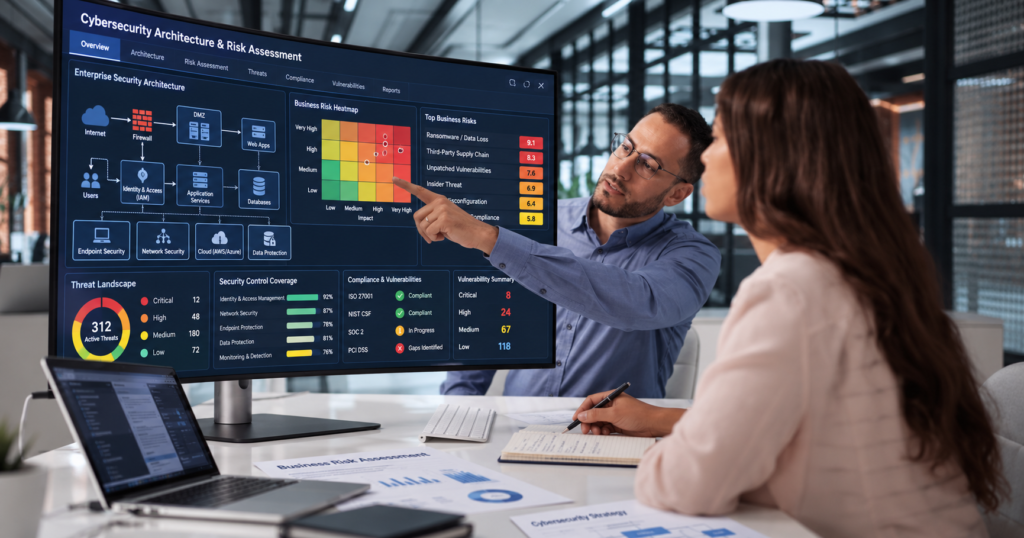
Security architecture should not begin with a logo wall.
It should begin with:
- Critical assets
- Threat exposure
- User and device patterns
- Regulatory requirements
- Recovery needs
- Internal security capacity
- Incident-response expectations
Fortinet, Sophos and Microsoft all offer broad security capabilities.
But a responsible comparison requires more than asking:
“Which brand is better?”
The stronger question is:
“Which combination of controls, operating model and support arrangement best addresses our actual risk?”
That requires looking at the exact:
- Product
- Edition
- Licence
- Deployment model
- Integration
- Support tier
- Managed-service arrangement
Do not infer coverage from a vendor name alone.
Start With the Business Risk
Before comparing products, identify what the organisation is trying to protect.
For example:
- Microsoft 365 identities
- Customer information
- Financial systems
- Laptops and servers
- Branch-office networks
- Data-centre infrastructure
- Cloud workloads
- Remote users
- Operational technology
- Email and collaboration
- Critical applications
Then ask:
- What could go wrong?
- How exposed is the organisation?
- Which failures would affect operations or customers most?
- Which controls already exist?
- Who currently monitors them?
- What happens after hours?
That creates a much stronger basis for vendor selection.
Map the Control Areas
A useful comparison should cover the main security control areas rather than treating each vendor as one giant product.
1. Identity
Identity is now central to most security architectures.
Review:
- User authentication
- Administrator authentication
- Privileged roles
- Third-party access
- Conditional access
- Account recovery
- Session control
- Identity monitoring
Ask:
Where is identity governed today, and who owns the exceptions?
For organisations already heavily invested in Microsoft 365 and Entra, Microsoft security capabilities may fit naturally into that identity environment.
But identity strength still depends on configuration, licensing and operational discipline.
2. Endpoint Security
Endpoints include:
- Laptops
- Desktops
- Servers
- Mobile devices
The organisation may need:
- Malware protection
- Attack-surface reduction
- Endpoint detection and response
- Vulnerability visibility
- Automated investigation
- Device isolation
- Central policy management
Microsoft currently describes Defender for Business as an endpoint-security solution designed for small and medium-sized organisations with up to 300 users. It includes endpoint-focused capabilities such as next-generation protection, attack-surface reduction, endpoint detection and response, and automated investigation and remediation. Server protection requires separate licensing considerations.
That does not mean Defender for Business alone covers every email, network, identity, cloud or managed-response requirement.
Evaluate those areas separately.
3. Email and Collaboration
Ask:
- Which email platform is used?
- Which collaboration tools are used?
- How are malicious links and attachments handled?
- Who investigates suspicious activity?
- Can administrators trace and respond to incidents?
- What happens when a mailbox is compromised?
For Microsoft-centric environments, email and collaboration protection may involve other Microsoft security products and licences beyond Defender for Business.
Do not assume endpoint protection automatically means complete email-security coverage.
4. Network and Edge Security
Network security requirements may include:
- Firewalls
- Branch connectivity
- Secure remote access
- SD-WAN
- Wi-Fi
- Data-centre segmentation
- Cloud networking
- Internet-facing services
- OT environments
Fortinet currently positions its secure-networking portfolio around technologies including firewalls, switches, wireless access points, WAN connectivity, management and security services. It also positions the broader Fortinet Security Fabric as an integrated platform spanning secure networking, security operations and other security domains.
That can make Fortinet especially relevant where network security and network operations are central to the architecture.
But the exact fit still depends on the products selected, deployment design and operational capability.
5. Detection and Response
Preventive controls are only part of the architecture.
Someone still needs to:
- Monitor alerts
- Investigate suspicious activity
- Confirm whether a threat is real
- Contain it
- Escalate it
- Document the response
- Coordinate recovery
Ask:
Who is watching after 6 p.m.?
If the answer is:
“Someone checks the dashboard in the morning,”
then the organisation may need a different operating model.
Sophos MDR and Managed Response
Sophos documents MDR response actions across supported:
- Endpoint
- Network
- Identity
The available actions depend on deployed technologies, integrations and configuration. Sophos also documents response-mode and authorisation considerations separately through its MDR service terms.
That makes the operating model especially important.
Do not ask only:
“Does Sophos have MDR?”
Ask:
- Which tier?
- Which integrations?
- Which actions are supported?
- What may the MDR team do automatically?
- What requires customer approval?
- What is outside scope?
The service definition matters more than the acronym.
6. Security Operations
Larger or more mature environments may also need:
- SIEM
- SOAR
- Threat intelligence
- Exposure management
- Centralised logging
- Incident investigation
- Cross-platform correlation
Fortinet currently positions its security-operations portfolio around technologies including FortiSIEM, FortiSOAR, FortiAnalyzer and related capabilities integrated into the Security Fabric.
Microsoft environments may use Microsoft Defender XDR, Sentinel and other Microsoft security services depending on the architecture and licences.
Sophos may provide managed-detection capability across supported third-party and Sophos controls.
The right question is:
How will telemetry become an actionable response?
Not:
“How many dashboards do we get?”
7. Cloud and Hybrid Environments
Many organisations now operate across:
- Microsoft 365
- Azure
- AWS
- On-premises servers
- Remote endpoints
- SaaS platforms
- Branch networks
That creates architecture decisions around:
- Identity
- Cloud posture
- Workload protection
- Network inspection
- Logging
- Centralised monitoring
- Incident response
A vendor may be strong in one area and less central in another.
That is normal.
The architecture does not have to be ideologically loyal to one logo.
Choose the Operating Model
Technology only works when someone operates it.
That means someone must own:
- Configuration
- Monitoring
- Investigation
- Containment
- Policy updates
- Escalation
- Improvement
There are three common operating models.
Internal Operation
The organisation operates the controls internally.
This may fit when the business has:
- Skilled security staff
- Defined responsibilities
- Monitoring capacity
- Incident authority
- Adequate coverage
Co-Managed Security
The internal team keeps some responsibilities while a partner provides:
- Monitoring
- Specialist expertise
- Escalation support
- Configuration assistance
- Incident support
This can work well where internal capability exists but is limited.
Managed Detection and Response
An MDR provider may monitor, investigate and in some cases take authorised response actions.
This may be useful where the organisation lacks:
- 24/7 coverage
- Detection expertise
- Incident-analysis capacity
But the service scope should be read carefully.
Confirm:
- Monitoring coverage
- Response actions
- Supported integrations
- Escalation time
- Customer approval model
- Reporting
- Service exclusions
Compare Capacity, Not Just Technology
Ask:
- Who reviews alerts?
- How quickly?
- What happens after hours?
- Who may isolate a device?
- Who may disable an account?
- Who contacts the customer or regulator?
- Who restores service?
The strongest technical platform can still fail operationally if nobody owns the response.
Test the Architecture Before Wider Deployment
A security architecture should be tested with representative users, devices and workflows.
Test:
- Deployment
- Policy enforcement
- Identity controls
- Logging
- Alert routing
- Detection
- Containment
- Recovery
- Reporting
Use controlled scenarios.
For example:
Suspicious sign-in
Can the team see it?
Who receives the alert?
Who may contain it?
Endpoint alert
Can the device be isolated?
Does the business understand the operational consequence?
Failed security integration
Does the failure become visible?
Who owns the fix?
Document Exclusions
Every architecture has boundaries.
Document what is not covered.
For example:
- Unsupported operating systems
- Legacy servers
- Third-party SaaS applications
- Personal devices
- Unsupported email platforms
- Unmonitored branches
- After-hours limitations
Unknown gaps are more dangerous than known ones.
Avoid Overlapping Tools Without a Plan
Multiple security products are not automatically bad.
But overlapping products should have a reason.
Ask:
- Which tool is authoritative?
- Which tool generates alerts?
- Which tool responds?
- Which team owns it?
- Are we paying twice for the same outcome?
- Does telemetry integrate?
- Are policies conflicting?
Do not build a security stack where three products all detect the same event but nobody knows which console to trust.
Do Not Consolidate Blindly Either
Consolidation can reduce:
- Licensing complexity
- Administration
- Integration effort
- Training burden
But consolidation should not create unacceptable gaps.
Do not remove a useful control simply because:
“We want one vendor.”
The goal is a coherent architecture.
Not vendor purity.
A Practical Comparison Framework
Use a matrix like this:
| Control Area | Requirement | Current Gap | Fortinet | Sophos | Microsoft | Owner |
|---|---|---|---|---|---|---|
| Identity | Strong admin controls | Medium | Validate | Validate | Validate exact Entra/Microsoft scope | IT |
| Endpoint | EDR + response | High | Validate product | Validate product/MDR | Defender option | Security |
| Prevention + investigation | Medium | Validate edition | Validate service/integration | Validate Defender for Office scope | IT | |
| Network | NGFW + branch control | High | Strong network portfolio | Validate exact firewall scope | May require complementary platform | Network |
| MDR | After-hours investigation | High | Validate managed options | Validate MDR tier | Validate Microsoft/partner operating model | Management |
Do not use the matrix to crown a winner.
Use it to expose requirements, gaps and unanswered questions.
Start With Five Questions
Before choosing between Fortinet, Sophos, Microsoft or a combination, answer:
- What are we protecting?
- What are the highest-impact threats?
- Which controls already exist?
- Who will operate them?
- What must happen when something goes wrong?
Then evaluate products.
Not the other way around.
The Best Architecture May Be Mixed
Some organisations may use:
- Microsoft for identity and endpoint
- Fortinet for network security
- Sophos MDR for managed detection
Another organisation may choose a more consolidated design.
Another may use entirely different combinations.
There is no universal answer.
The correct architecture depends on:
- Existing technology
- Risk
- Skills
- Budget
- Scale
- Compliance
- Support expectations
The brand combination is the result of the design process.
It should not be the starting point.
Use the Security Solution Selection Matrix
Before selecting tools, complete a Security Solution Selection Matrix.
For each control area, record:
- Business requirement
- Existing control
- Gap
- Proposed product
- Exact edition/licence
- Integration
- Owner
- Support model
- Evidence of successful testing
That creates a much stronger buying conversation.
Discuss Your Security Architecture With TechBots
TechBots helps organisations assess cybersecurity architecture across:
- Identity
- Endpoints
- Networks
- Cloud
- Security operations
- Managed detection
- Incident response
To discuss your environment:
Book a 30-minute TechBots consultation
Or call/WhatsApp:
09169337821
Human support: Monday–Friday, 9:00 a.m.–6:00 p.m. GMT+1.
Product scope, licences, service tiers, technical access, managed-response coverage and pricing should be confirmed for the specific solution before purchase.