
A Nigerian SME does not need a large security department to ask useful cybersecurity questions.
It needs clarity about:
- Which systems matter most
- What information they hold
- Who can access them
- What protections are in place
- Who responds when something fails
- Whether the business can recover
That is the purpose of this quarterly review.
It is not a promise of complete protection and it is not a certification exercise.
It is a structured management conversation.
Bring together the people responsible for operations, IT, finance, customer service and leadership.
Then choose one important business service to examine.
For example:
- Business email
- Payments
- Customer records
- School administration
- Clinical operations
- Order fulfilment
- Payroll
- E-commerce
- CRM
- File storage
For every answer, ask for evidence.
A policy saying something should happen is useful.
Evidence showing that it did happen is better.
1. Name a Business Owner for Security Decisions
Cybersecurity cannot belong only to “the IT person.”
Someone in leadership should be accountable for decisions involving:
- Risk priorities
- Budget
- Exceptions
- Business trade-offs
- Review dates
- Acceptance of unresolved risks
The technical team may operate controls.
But if a control affects revenue, operations, customer service or cost, an authorised business owner may need to make the final decision.
Record:
- Business owner
- Internal IT/security contact
- External support provider
- After-hours route
- Escalation authority
“Call IT” is not a complete incident process if nobody knows who may isolate a device, disable an account or contact a critical provider.
2. Identify Critical Data and Services
Start with what the business cannot easily operate without.
That may include:
- Customer information
- Financial records
- Payroll
- Business email
- CRM
- School records
- Clinical information
- E-commerce systems
- Accounting software
- Cloud applications
- Internet connectivity
- Important devices
- Critical suppliers
Do not wait until every cable, printer and forgotten laptop has been inventoried.
Begin with the service whose interruption would create the clearest operational problem.
Then ask:
- What does it depend on?
- Where is the data stored?
- Who administers it?
- Which vendors support it?
- How would the business operate if it became unavailable?
That creates a practical map of business dependency.
3. Review User Accounts and Access
Access should match the person’s current role.
Every quarter, review whether:
- Active accounts belong to current staff
- Former employees have been removed
- Role changes are reflected
- Privileged accounts are still required
- Shared accounts are controlled
- External users still need access
Ask for evidence such as:
- Current user list
- Last review date
- Approver
- Exceptions
- Leaver records
A written access-control policy does not prove that today’s access is correct.
The review does.
Pay Special Attention to Privileged Accounts
Administrative accounts deserve separate review.
Ask:
- Who has administrator access?
- Why do they need it?
- When was the access last reviewed?
- Is the account used for normal day-to-day work?
- What happens when the administrator leaves?
Privileged access can create disproportionate risk if it is poorly controlled.

4. Strengthen Authentication and Recovery
Use stronger authentication where the platform supports it, especially for:
- Business email
- Administrative accounts
- Finance systems
- Remote access
- Cloud applications
- Sensitive customer systems
But do not stop at sign-in.
Review account recovery too.
A strong login process can still be undermined by a weak password-reset process.
Ask:
- How does a locked-out employee get help?
- Who verifies the person’s identity?
- Who can reset an account?
- Are one-time codes ever shared?
- Are recovery contacts still current?
Employees should never be encouraged to share passwords or authentication codes.
5. Manage Company Devices
Maintain a working inventory of devices used for business.
This may include:
- Laptops
- Phones
- Servers
- Tablets
- Network equipment
- Shared workstations
Record useful information such as:
- Assigned user
- Device owner
- Operating-system status
- Security protection
- Last update
- Lost-device procedure
- Disposal status
The inventory does not need to become a museum catalogue.
It needs to help the business understand what can access important information.
Define Personal-Device Boundaries
If staff use personal devices for work, decide:
- Which systems they may access
- What security controls are required
- Whether local storage is permitted
- How business data is separated
- How access is removed when employment ends
“Everyone uses their own phone” is an operating choice.
It should have controls attached to it.
6. Keep Systems and Applications Supported
Security updates should have an owner.
Review more than employee laptops.
Include:
- Operating systems
- Business applications
- Servers
- Routers
- Firewalls
- Website plugins
- Cloud integrations
- Remote-access tools
- Database platforms
Identify:
- Unsupported software
- Missing updates
- Systems that cannot currently be patched
- People responsible for remediation
If an important system cannot be updated immediately, record:
- Reason
- Risk
- Temporary protection
- Owner
- Target date
Do not allow the exception to become permanent simply because nobody revisits it.
7. Protect Email and Collaboration
Email is closely connected to many business processes.
Review:
- Suspicious-message reporting
- External-message handling
- Sign-in protection
- Domain security controls
- Shared mailboxes
- Administrative access
- Payment-change procedures
- Bank-detail verification
Train staff to verify sensitive requests through a trusted independent route.
Do not use the phone number or contact information contained in the suspicious message itself.
The Phishing Spotter Guide can support employee awareness here.
But awareness is only one layer.
It should work alongside:
- Identity protection
- Email security
- Device protection
- Monitoring
- Incident response
8. Review Internet and Network Exposure
Know what the business exposes to the internet.
Ask:
- Which systems accept external connections?
- Is remote administration enabled?
- Who can change router or firewall settings?
- Are old remote-access tools still active?
- Which vendors have network access?
- Are exposed services still required?
Small businesses often inherit network settings from older projects, previous vendors or temporary fixes.
Temporary infrastructure has an impressive talent for becoming permanent.
Review each important exposure for:
- Current need
- Owner
- Access method
- Logging
- Removal date if temporary
Do not assume an old configuration remains appropriate because nothing obvious has gone wrong yet.
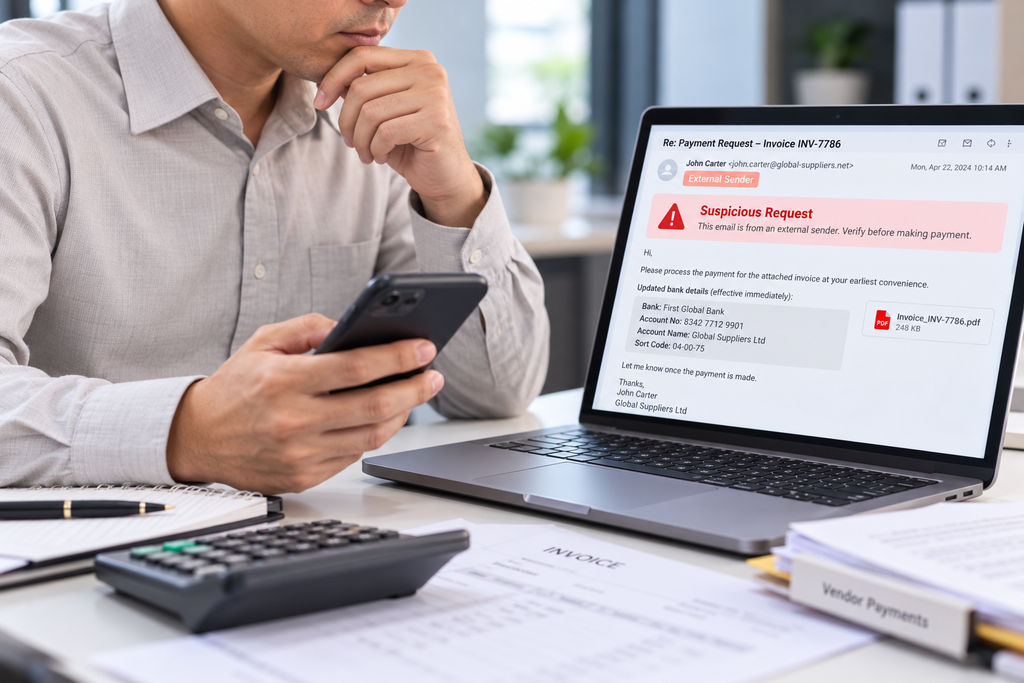
9. Control Sensitive Changes and Payments
High-impact financial changes need independent verification.
Examples include:
- Bank-detail changes
- New beneficiaries
- Unusual transfers
- Payment exceptions
- Payroll changes
- Important account changes
Where practical, separate:
Request → Verification → Approval → Execution
Do not allow urgency to bypass the process.
Define:
- Trusted verification channel
- Approver
- Backup approver
- Evidence required
- What happens if the normal approver is unavailable
This protects both finance and the people being pressured to make the decision.
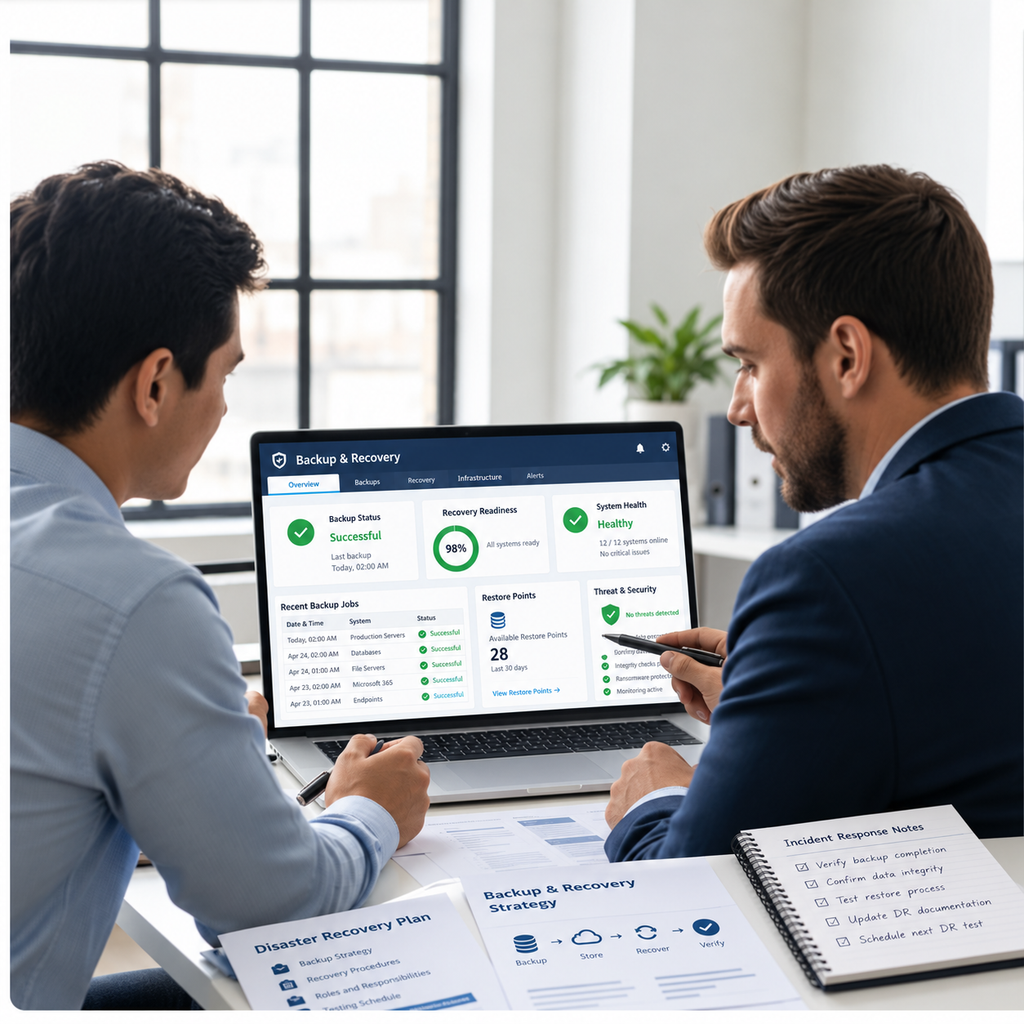
10. Back Up What the Business Actually Needs
A backup strategy should begin with recovery requirements.
Ask:
What information, applications and configurations would we need to resume useful work?
Then review:
- Backup frequency
- Retention
- Encryption
- Access
- Location
- Separation from production systems
- Monitoring
- Ownership
The familiar 3-2-1 idea can be a useful design prompt:
- Three copies
- Two types of storage
- One copy off-site
But the correct architecture depends on the business.
Modern ransomware planning may also require protected, isolated or otherwise resilient backup copies and tightly controlled access.
11. Test Restoration
A completed backup job does not prove that recovery works.
Restore something.
It could be:
- A selected folder
- A database
- An application
- A configuration
- A small business service
Use a controlled environment.
Then check:
- Did the data restore?
- Was it complete?
- Did permissions work?
- Were required dependencies available?
- How long did recovery take?
- Did the result meet the business need?
Document what failed.
Assign a corrective action.
A recovery test converts confidence into evidence.
12. Make Important Events Visible
Decide which security events deserve attention.
Examples may include:
- Unexpected administrator changes
- Suspicious sign-ins
- Disabled protection
- Backup failures
- Unusual payment activity
- Account lockouts
- New privileged users
- Critical system failures
Then ask:
Who actually sees the alert?
An unread dashboard is not monitoring.
Define:
- Owner
- Review window
- Escalation path
- After-hours route
- Expected action
Alerts without ownership simply produce colourful evidence that the system noticed something before the humans did.

13. Write a Simple Incident Process
Staff need to know what to do when something appears wrong.
The first instruction should be simple:
Stop further risky action.
Report through the approved route.
Explain what happened.
Then define:
- Who assesses the event
- Who can contain it
- Who communicates internally
- Who contacts external providers
- Who communicates with customers where appropriate
- Who records the incident
- Who declares recovery complete
Avoid a blame culture that encourages staff to hide mistakes.
Early reporting helps the organisation respond faster.
Prepare for Different Incident Types
The response may differ depending on whether the incident involves:
- Suspicious email
- Compromised account
- Lost device
- Malware
- Fraudulent payment
- Data exposure
- Service outage
- Vendor compromise
Do not assume one universal incident script fits every situation.
Assign the decisions to authorised people.
14. Review Important Suppliers
Many SMEs depend heavily on external providers.
Create a simple list of suppliers that:
- Host important data
- Process payments
- Manage devices
- Provide internet access
- Support business applications
- Provide cloud services
- Administer security systems
- Support critical operations
For each important provider, record:
- Current contact
- Service provided
- Systems involved
- Access provided
- Support route
- Escalation path
- Data export expectations
- Exit arrangements
Do not assume a vendor logo, badge or questionnaire answers every security question.
The SME still needs to understand:
What the provider does.
What the business remains responsible for.
What evidence is available.
15. Run a Quarterly Management Review
The purpose of the checklist is action.
For each important finding, record:
- Business impact
- Evidence
- Owner
- Required action
- Due date
- Acceptance condition
Then prioritise.
Do not create a 70-line security action plan that nobody has the capacity to complete.
Choose a few important gaps.
Fix them.
Review the evidence.
Then move to the next priorities.
Use a Simple Evidence Table
A quarterly review can use a format like this:
| Finding | Business Impact | Evidence | Owner | Due Date | Acceptance Condition |
|---|---|---|---|---|---|
| Former-user accounts remain active | Unnecessary access | Current user list | IT Lead | 20 Oct | Accounts disabled and reviewed |
| Backup restore not tested | Recovery uncertain | Backup report only | Operations | 30 Oct | Controlled restore completed |
| No after-hours security route | Delayed escalation | Incident process | Management | 25 Oct | Route documented and tested |
The specific format matters less than visible ownership.
Use NIST CSF 2.0 as a Useful Reference Structure
The NIST Cybersecurity Framework 2.0 provides a useful vocabulary for organising cybersecurity activity around six functions:
Govern
Identify
Protect
Detect
Respond
Recover
That structure can help an SME organise its security conversations without requiring every business to implement technology in exactly the same way.
This checklist uses the same broad idea:
- Understand the business
- Assign responsibility
- Protect important services
- Detect problems
- Respond clearly
- Recover deliberately
It does not certify compliance with NIST CSF 2.0 or any other security standard.
What Evidence Should Management Ask For?
A useful quarterly meeting should contain evidence, not just reassurance.
Examples include:
- Current user list
- Device inventory
- Last access review
- Backup report
- Restore-test result
- Patch status
- Incident contact list
- Supplier register
- Security-alert review
- Payment-verification procedure
- Staff reporting route
The management question should be:
“How do we know this is working?”
not simply:
“Do we have a policy for it?”
Start With One Critical Business Service
If fifteen checks feel too broad, choose one important service.
For example:
Business email
Then review:
- Owner
- Users
- Authentication
- Devices
- Updates
- Suspicious-message reporting
- Monitoring
- Backup or recovery requirements
- Incident process
- External provider
Or choose:
Customer records
and perform the same review.
This keeps the exercise manageable.
What a Quarterly SME Security Review Should Produce
At the end of the meeting, management should know:
What matters most.
Who owns it.
What evidence exists.
Which gaps remain.
What will be fixed next.
How the business would respond if something failed.
That is a much more useful outcome than a thick cybersecurity document sitting untouched in a shared folder.
Use the Nigeria SME Security and Recovery Checklist
The Nigeria SME Security and Recovery Checklist can be used as the working document for this quarterly review.
For each area, record:
- Current state
- Evidence
- Gap
- Owner
- Action
- Due date
- Review result
Use it with leadership, operations, IT, finance and other relevant teams.
The aim is not to prove that the organisation is perfectly secure.
It is to make security responsibilities and recovery capability more visible.
Discuss Your Security Architecture With TechBots
For organisations that need a more structured review of cybersecurity controls, recovery, identity, endpoints, networks or incident readiness, explore:
TechBots Cybersecurity Services
https://teckbots.com/services/cybersecurity/
To discuss a scoped security review with TechBots Experts Nigeria, contact:
09169337821
Human support: Monday–Friday, 9:00 a.m.–6:00 p.m. GMT+1.
Incident-response coverage, technical access, implementation scope, pricing and after-hours support should be confirmed separately.